Hour 031

This card is from SVS Light and Shadow class.

With an exterior scene, you need to pay more attention to the relative values since there can be large blocks for sky, building, ground. How do they relate to each other and how do you want to drive the focus. This was also a good lesson on basic Photoshop tools. I’m getting better at just understanding the basics.

This example was from a sketch given to us in class. Next time I will work from a photo reference or my own sketch.

Photoshop using Huion tablet.

It took more about an hour working with the class demo to complete this image.

greyscale sketch painting of a house

Hour 030

This card is SVS Light and Shadow class.

This lesson is about how to work through roughing in the local tone of an illustration. We work from a line sketch and draw in values based on an example. Lee gives us a good approach to work from to get through the scene. It’s a lot of work to figure out the shapes, layers, and values. We want to work with as few of values as possible, 3-5, but still being able to have the scene make sense. It’s also a good overview of tools in Photoshop and how to use them to paint in a scene.

Next time I will work with a reference scene without an underlying sketch. Just to get the practice in. As I do more interior sketching, I can use some of my sketches for a base.

Photoshop using Huion tablet.

This took me about an hour working through the demo on an underlying sketch from class to complete this image.

a value sketch of a kid's bedroom from a reference sketch

Hour 029

This card is from SVS How to Draw Everything.

This lesson is about using all the lessons from the class and drawing a building. I took a house from the Arcadia server to draw. It came out fairly good. Better than I think I would have drawn it a few months ago. I have some better tools to get the basic shapes down better to begin with, then adding in more detail as I go. I still don’t have a good feel for all the details to add to a building. Starting from a Minecraft reference might not be the best. The details don’t exist there where they might in a real photo or from life. But, I feel like it turned out well.

Next time I will work from a better, more detailed reference. I’ll also add more greenery around it. It seems very bare. I did this in photoshop instead of on paper, and I think the process was ok. I will also watch the demo again next time to see if I missed anything about the process.

Photoshop using Huion tablet.

I spent about 1 hour to complete this image.

digital sketch of a cute cottage

Hour 028

This card is from SVS Light and Shadow class.

This lesson is about Local Tone and how we need to establish local tone first before we start looking at how to render the shadows or the light. This is all about what the base tone of the object is, light, mid or dark, and in relation to other things in the illustration. There are no shadows yet, so a box will appear as just one flat tone without shadows or light hitting different sides.

I worked through an hour on this class, working along with the examples to get this image. Next time I will work with other reference examples.

Photoshop using Huion tablet.

I did about an hour of class time to complete this image.

simple shapes and a robot in local tone without shadow or color

Hour 027

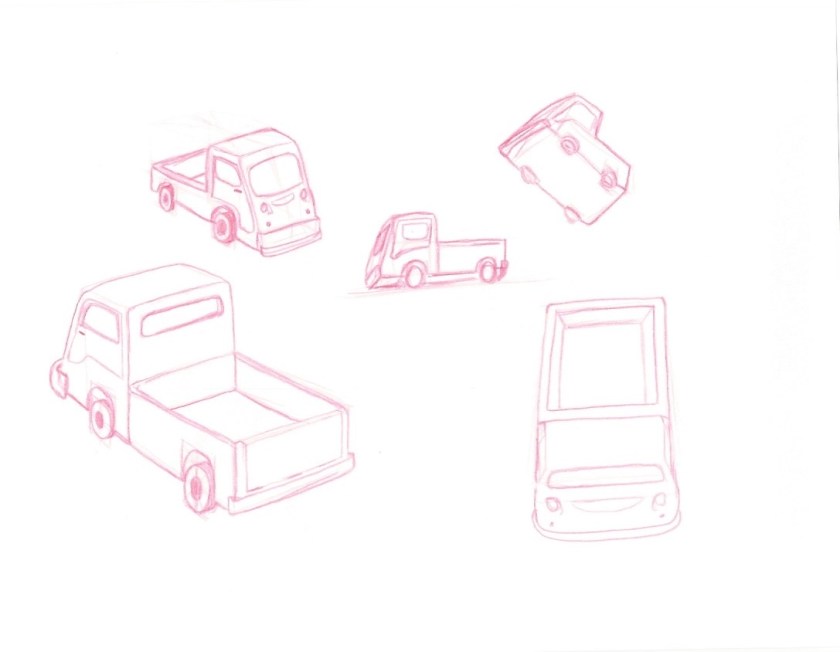
This card is from SVS Visualizing Drawing in Perspective.

This lesson is about being able to take a reference and draw the object from any angle. So instead of relying on finding the perfect reference in the perfect angle, we try to learn the basic shapes that make up the object and then we can rotate or move the object in any direction. The emphasis is being able to visualize things. I did some practice as I watched the lessons and the demo, then did this practice sheet of a funky little truck. It got easier as I went, since I got more familiar with the basic shapes. The hardest part was deciding on a reference. I have some books with robots and spaceships. I should use that instead of searching for an image online. Or, grab references of things when I happen to see them, and keep them in a folder.

Next time I will do this in Photoshop to get more practice there. Although, this is a fun and fairly easy exercise to do on paper too.

Col-erase pencil on letter size copy paper.

I did 30 minutes practice and then 30 minutes to complete this image.

red pencil sketches of a funky little truck from many different perspectives